
 Вход
Вход
 Регистрация
 Помощь


Я решил показать как можно сделать HUD на CEF для вашего SAMP сервера.
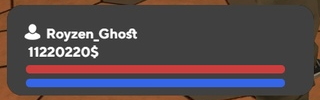
В данном уроке нам нужно:
1.Плагин sscanf 2.8.3
2.Плагин Pawn.CMD
3.Плагин CEF
4.Web хостинг для файлов
5.Умение заливать файлы на хостинг
1.Для начала арендуем хостинг ( Рекомендую beget.com )
Создадим в нашем проекте файлы style.css, index.html, cef-interface.js , затем зальем их на хостинг.
Далее будет заполнять наши файлы кодом.
1.style.css
.container
{
    width: 10%;
}
.bg_interface {
	border-width: 0px;
	border-color: rgb(0, 0, 0);
	border-style: solid;
	border-radius: 20px;
	background-color: rgb(64, 64, 64);
	position: absolute;
	left: 472px;
	top: 770px;
	width: 403px;
	height: 119px;
	z-index: 1;
}
  .nick_text {
	font-size: 18px;
	font-family: "TT Norms";
	color: rgb(255, 255, 255);
	font-weight: bold;
	line-height: 0.1;
	text-align: center;
	position: absolute;
	left: 490px;
	top: 807px;
	width: 187px;
	height: 23px;
	z-index: 3;
  }

  .nick_img {
	background-image: url("nick_img.png");
	position: absolute;
	left: 495px;
	top: 795px;
	width: 21px;
	height: 21px;
	z-index: 2;
  }
  .money_text {
	font-size: 18px;
	font-family: "TT Norms";
	color: rgb(255, 255, 255);
	font-weight: bold;
	line-height: 0.944;
	text-align: center;
	position: absolute;
	left: 500px;
	top: 824px;
	width: 88px;
	height: 29px;
	z-index: 4;

  }

  progress.styled {
	display: block;
	border-radius: 8px;
	width: 340px;
	height: 11px;
	z-index: 6;
	position: absolute;
	left: 497px;
	top: 849px;
  }

  progress.styled::-webkit-progress-bar {
      background-color: rgb(82, 82, 82);
      border-radius: 8px;
  }
  progress.styled::-webkit-progress-value {
      background-color: rgb(204, 62, 62);
      background-image: linear-gradient(rgb(204, 62, 62)), rgb(204, 62, 62));
      border-radius: 8px;
  }
  progress.styled::-moz-progress-bar {
      background-color: rgb(204, 62, 62);
      background-image: linear-gradient(rgb(204, 62, 62), rgb(204, 62, 62));
      border-radius: 8px;
  }

  progress.styled1 {
	display: block;
	border-radius: 8px;
	width: 340px;
	height: 11px;
	z-index: 6;
	position: absolute;
	left: 497px;
	top: 867px;
  }

  progress.styled1::-webkit-progress-bar {
      background-color: rgb(82, 82, 82);
      border-radius: 8px;
  }
  progress.styled1::-webkit-progress-value {
      background-color: rgb(53, 101, 233);
      background-image: linear-gradient(rgb(53, 101, 233)), rgb(53, 101, 233));
      border-radius: 8px;
  }
  progress.styled1::-moz-progress-bar {
      background-color: rgb(53, 101, 233);
      background-image: linear-gradient(rgb(53, 101, 233), rgb(53, 101, 233));
      border-radius: 8px;
  }

  .text_notification {
	font-size: 17px;
	font-family: "TT Norms";
	color: rgb(0, 144, 255);
	font-weight: bold;
	line-height: 0.944;
	text-align: center;
	position: absolute;
	left: 1230.39px;
	top: 330.573px;
	width: 340px;
	height: 17px;
	z-index: 3;
  }
  .bg_notification {
	border-width: 0px;
	border-color: rgb(0, 0, 0);
	border-style: solid;
	border-radius: 20px;
	background-color: rgb(64, 64, 64);
	position: absolute;
	left: 1209px;
	top: 310px;
	width: 392px;
	height: 104px;
	z-index: 1;
  }
  .text_slide_notification {
	font-size: 17px;
	font-family: "TT Norms";
	color: rgb(255, 255, 255);
	font-weight: bold;
	line-height: 0.944;
	text-align: center;
	position: absolute;
	left: 1230.39px;
	top: 360.933px;
	width: 307px;
	height: 18px;
	z-index: 4;
  }
  .bg_key {
	border-width: 0px;
	border-color: rgb(0, 0, 0);
	border-style: solid;
	border-radius: 5px;
	background-image: -moz-linear-gradient( 90deg, rgb(215,215,215) 0%, rgb(255,255,255) 100%);
	background-image: -webkit-linear-gradient( 90deg, rgb(215,215,215) 0%, rgb(255,255,255) 100%);
	background-image: -ms-linear-gradient( 90deg, rgb(215,215,215) 0%, rgb(255,255,255) 100%);
	position: absolute;
	left: 1549px;
	top: 357px;
	width: 26px;
	height: 27px;
	z-index: 2;
  }
  .key_text {
	font-size: 20px;
	font-family: "TT Norms";
	color: rgb(0, 144, 255);
	font-weight: bold;
	line-height: 0.85;
	text-align: center;
	-moz-transform: matrix( 1.02493819658632,0,1.07034501209888e-14,1.02493819658632,0,0);
	-webkit-transform: matrix( 1.02493819658632,0,1.07034501209888e-14,1.02493819658632,0,0);
	-ms-transform: matrix( 1.02493819658632,0,1.07034501209888e-14,1.02493819658632,0,0);
	position: absolute;
	left: 1554.154px;
	top: 362.498px;
	width: 11.5px;
	height: 14px;
	z-index: 5;
  }
  progress.styled2 {
	display: block;
	border-radius: 8px;
	width: 340px;
	height: 8px;
	z-index: 6;
	position: absolute;
	left: 1235.39px;
	top: 395.933px;
  }

  progress.styled2::-webkit-progress-bar {
      background-color: rgb(82, 82, 82);
      border-radius: 8px;
  }
  progress.styled2::-webkit-progress-value {
      background-color: rgb(53, 101, 233);
      background-image: linear-gradient(rgb(53, 101, 233)), rgb(53, 101, 233));
      border-radius: 8px;
  }
  progress.styled2::-moz-progress-bar {
      background-color: rgb(53, 101, 233);
      background-image: linear-gradient(rgb(53, 101, 233), rgb(53, 101, 233));
      border-radius: 8px;
  }

Затем вставим код в html.
2.index.html
<!doctype html>
<html>
<head>
	<meta charset="utf-8">
	<meta name="viewport" content="width=device-width, initial-scale=1">
	<link rel="stylesheet" href="style.css">
<title>interface</title>
</head>

<body>
	<div class="bg_interface"></div>
	<div class="nick_img"></div>
		<a id="nick" class="nick_text">Royzen_Ghost</a>
		<a id="money" class="money_text">1000000$</a>
		<progress id="progress" class="styled" max="100" value="0"></progress>
		<progress id="progress2" class="styled1" max="100" value="0"></progress>
</body>
	<script src="cef-interface.js?ver=1452324"></script>
</html>
3. Затем создадим наш cef-interface.js
let nicks = document.querySelector('.nick_text');
let moneys = document.querySelector('.money_text');
let progress = document.querySelector('.styled');
let armour = document.querySelector('.styled1');


cef.emit('pwd:try');

//interface off
cef.emit("game:hud:setComponentVisible", "interface", false);

cef.on('pwd:money', (response) => {

	moneys.innerHTML += response + "$"; //это можно использовать как первый вариант ( второй: moneys.innerHTML = "$" + money; )
});
cef.on('pwd:armour', (armours) => {
	armour.value = armours;
});
cef.on('pwd:hp', (hp) => {

	progress.value = hp;
});
cef.on('pwd:nick', (response) => {
	nicks.innerHTML = response;

});


//новая функция ( -1 не работает )

cef.on('pwd:allitem', (money, nick, armours, hp) => {
	if(money != -1)
	{
		moneys.innerHTML += money + "$";
	}
	if(nick != "")
	{
		nicks.innerHTML = nick;
	}
	if(armours != -1)
	{
		armour.value = armours;
	}
	if(hp != -1)
	{
		progress.value = hp;
	}

});
2. После создания и заполнения наших файлов их нужно залить на хостинг.
3. Теперь мы перейдем с вами к Pawn коду.
#include <cef>
#include <Pawn.CMD>
#include <sscanf2>

#define LOGIN_BROWSER_ID 0x12346

public OnGameModeInit()
{
	cef_subscribe("pwd:try", "CefInterface"); //подписываемся на событие js скрипта и передаем его в игру
	return 1;
}

public OnPlayerSpawn(playerid)
{
	cef_create_browser(playerid, LOGIN_BROWSER_ID, "ваш url на сайт", false, false); //создаем браузер
	return 1;
}

//cef
forward OnCefInitialize(player_id, success);
forward OnCefBrowserCreated(player_id, browser_id, status_code);
forward CefInterface(player_id);

public OnCefInitialize(player_id, success) {
    if (success == 1) {
        return;
    }

}

public OnCefBrowserCreated(player_id, browser_id, status_code) {
    if (browser_id == LOGIN_BROWSER_ID) {
        if (status_code != 200) {
            return;
        }

    }
}
public CefInterface(player_id) //выставляем настройки и отправляем их до отрисовки
{
	new money = GetPlayerMoney(player_id), Float:armour, Float:hp, name[40];
	GetPlayerName(player_id, name, sizeof(name));
	GetPlayerHealth(player_id, hp);
	GetPlayerArmour(player_id, armour);
	cef_emit_event(player_id, "pwd:allitem", CEFINT(money), CEFSTR(name), CEFINT(armour), CEFINT(hp));
}
//тестовые команды для проверки
cmd:set_hp(player_id, arg[])
{
	new hp;
	if(sscanf(arg, "i", hp)) return SendClientMessage(player_id, -1, "/set_hp [hp int]");
	cef_emit_event(player_id, "pwd:hp", CEFINT(hp));
	SendClientMessage(player_id, -1, "Успех");
	return 1;
}
cmd:set_money(player_id, arg[])
{
	new money;
	if(sscanf(arg, "i", money)) return SendClientMessage(player_id, -1, "/set_money [money]");
	GivePlayerMoney(player_id, money);
	cef_emit_event(player_id, "pwd:money", CEFINT(money));
	SendClientMessage(player_id, -1, "Успех");
	return 1;
}
3.После всех этих действий , заходим в игру и радуемся худу.
Ссылка на загрузку CEF и примера: Google, MEGA
Как установить:
После загрузки архива откройте папку cef_client, затем перекиньте данные файлы в игру. ( также закиньте файл cef.asi в корень ) .
Папку cef_client переименуйте в cef.
В папке "Пример" находиться index.html, cef-interface.js там можно скопировать код.
В папке "pawn" там лежат плагины для работы cef.
Автор: Я
Кому не сложно дайте + )
UPD:
При добавлении чего-то нового cef не забывайте удалять папку cache в папке cef. Иначе новые функции у вас не будут показываться.
Сообщение отредактировал Romzes: 05 марта 2023 - 07:27


